

Source Pane
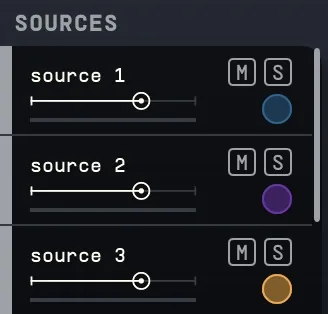
Access the full list of your Sources (up to 64 mono inputs), their Gain, Solo and Mute buttons for each. This displays the level metering and the assigned bus for that source, you can also change the name of the source.
13.1For naming and labeling
Using Ctrl + Click (Windows) or Cmd + Click (Mac) on the source label allows you to change its name.7
Double-clicking on the leftmost coloured slip (white/gray by default), will allow for the colour of the source to be changed.
13.2Grouping
By selecting multiple sources, you can create groups, keeping the positions where you have placed them, or using a preset configuration (i.e. 5.1, wide stereo, etc.). Using shift, you can select the sources you want to group, right click on them. You will then see the grouping options available for that number of channels. Choose if you want to use a position preset or keep their assigned position.
When grouped sources will follow the position changes relative to each other, as well as reverb sends and assignment.
You can still modify the controls for a single source when grouped by holding Shift while you perform the change.
The renaming and colouring of the Groups works exactly as the renaming of Sources explained above.